Sometimes you don’t need the entire YouTube video—you only want the audio. Whether it’s a podcast, interview, lecture, music track, or other content, an online YouTube to MP3 converter can turn a supported YouTube video into an audio file that you can listen to offline.
The advantage of online converters is convenience. You don’t necessarily need to install desktop software or a dedicated application. Most tools work directly from a web browser: copy a YouTube URL, paste it into the converter, select MP3, and download the resulting file.
In this guide, we’ll look at some popular YouTube to MP3 converters, what makes each one useful, and what you should consider before choosing one.
An overview of the YouTube-to-MP3 conversion process and popular online converter options.
Important: Only download or convert content when you have the right to do so. YouTube’s terms and copyright rules may restrict downloading or converting certain content.
What Is a YouTube to MP3 Converter?
A YouTube to MP3 converter is an online service that extracts audio from a supported YouTube video and provides it as an MP3 file.
The process is generally straightforward:
YouTube video → Copy URL → Paste into converter → Select MP3 → Download
Most browser-based converters don’t require additional software, making them accessible from computers, tablets, and smartphones.
Best Online YouTube to MP3 Converters
Here are several commonly used online options. Availability, features, domains, and supported formats can change over time, so check the current service before using it.
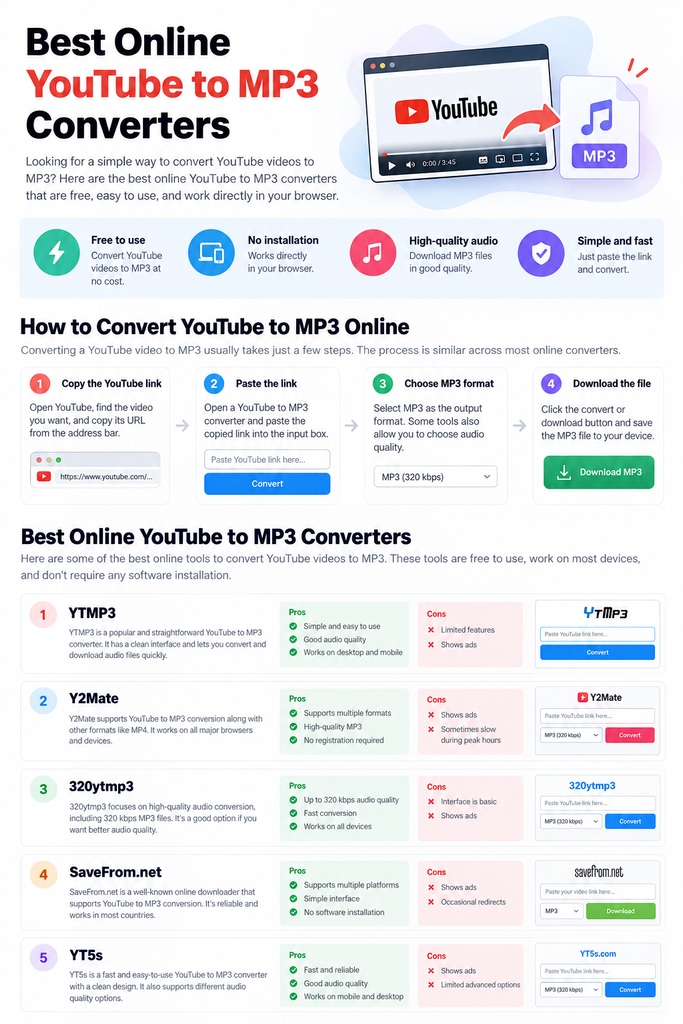
1. YTMP3
YTMP3 is designed around a simple conversion experience. Its straightforward interface makes it appealing if you don’t want to deal with complicated settings.
Pros:
- Simple interface
- Easy conversion process
- Works directly in a browser
- Minimal configuration
Cons:
- Advertising can be present
- Advanced options may be limited
Best for: Users who want a simple YouTube-to-MP3 workflow.
2. Y2Mate
Y2Mate is another well-known browser-based downloader that has supported different media formats and platforms.
Its appeal is its straightforward workflow: paste a supported video URL, choose the desired format, and start the conversion.
Pros:
- Supports multiple formats
- Easy to understand
- No desktop software required
- Works across common browsers
Cons:
- Advertising and redirects may occur
- Performance can vary
Best for: Users looking for multiple format options alongside MP3 conversion.
3. 320ytmp3
As its name suggests, 320ytmp3 focuses on high-quality MP3 output where the source and service support it.
For users who care about audio quality, checking the available bitrate options can be useful before starting a conversion.
Pros:
- Focuses on MP3 conversion
- High-bitrate options may be available
- Simple interface
- Browser-based
Cons:
- Interface can be basic
- Advertising may be present
Best for: Users who prioritize available audio-quality options.
4. SaveFrom.net
SaveFrom.net is a broader online media-downloading service rather than a tool dedicated exclusively to YouTube-to-MP3 conversion.
Depending on the current service and supported sources, it can provide different download options.
Pros:
- Supports multiple platforms
- Browser-based
- Straightforward interface
- Doesn’t require traditional desktop software
Cons:
- Ads and redirects may appear
- Available formats can change
Best for: Users who want a broader online media downloader.
5. YT5s
YT5s is another online conversion service built around a simple URL-based workflow.
The interface generally emphasizes speed and ease of use rather than advanced configuration.
Pros:
- Simple workflow
- Works through a browser
- Supports different media options
- Mobile-friendly interface
Cons:
- Advertising may be present
- Advanced controls can be limited
Best for: Users who want a straightforward conversion experience.
How to Convert YouTube Videos to MP3 Online
Although the interface differs between services, the basic process is usually similar.
Step 1: Find the YouTube Video
Open YouTube and locate the video you want to convert.
Make sure you have the necessary rights or permission to download and convert the content.
Step 2: Copy the Video URL
Copy the video’s URL from your browser’s address bar or use YouTube’s Share → Copy link option.
Step 3: Open an Online Converter
Open a reputable YouTube-to-MP3 conversion service in your browser.
Step 4: Paste the URL
Paste the copied YouTube URL into the converter’s input field.
Step 5: Select MP3
If multiple formats are available, select MP3 as the output format. Some services may also offer different audio-quality options.
Step 6: Download the File
Start the conversion and download the resulting audio file if the service successfully processes the video.
What Should You Look for in a YouTube to MP3 Converter?
Choosing a converter isn’t just about finding the first result in Google. Several factors can affect the experience.
Audio Quality
If sound quality matters, check whether the service provides different bitrate options.
A higher bitrate doesn’t necessarily improve audio beyond the quality of the original source, so the source itself remains important.
Conversion Speed
A good converter should process supported videos reasonably quickly without forcing you through unnecessary steps.
Ease of Use
The best interfaces are usually simple: one URL field, a format selector, and a clear conversion button.
Device Compatibility
A browser-based converter should work properly on the device you’re using, whether that’s a Windows PC, Mac, Android phone, or iPhone.
Safety
Be particularly careful with unfamiliar converter websites. Avoid services that ask for your YouTube or Google password, require unnecessary browser extensions, or ask you to install unknown software.
Online Converter vs. Desktop Software
Both approaches have advantages.
| Feature | Online Converter | Desktop Software |
| Installation | Usually not required | Required |
| Works in browser | Yes | No |
| Setup | Minimal | Usually more involved |
| Convenient for occasional use | Excellent | Less convenient |
| Advanced controls | Usually limited | Often more extensive |
| Internet connection | Required | Depends on software |
For occasional conversions, an online tool can be more convenient. Users who frequently work with large numbers of files may prefer dedicated software with more control.
Are YouTube to MP3 Converters Free?
Many online converters advertise free conversion. However, free services may rely on advertising or impose limitations on conversion speed, file quality, or supported content.
Some services may also offer premium versions with additional features.
Always check what you’re actually downloading and avoid entering payment or account information into suspicious websites.
Are YouTube to MP3 Converters Safe?
The answer depends on the specific website.
Third-party conversion sites can sometimes contain aggressive advertisements, redirects, misleading download buttons, or unwanted software.
For a safer experience:
- Don’t enter your Google or YouTube password.
- Don’t install unknown applications or browser extensions.
- Avoid clicking suspicious pop-ups.
- Check that you’re downloading the intended file.
- Keep your browser and security software updated.
- Don’t provide unnecessary personal information.
Is Converting YouTube Videos to MP3 Legal?
This depends on the content, how you use it, and the laws and terms applicable to you.
Copyright owners generally control how their content can be reproduced and distributed. YouTube also has its own terms governing how content can be accessed and downloaded.
Converting copyrighted music or other protected content without authorization can create legal issues.
A safer approach is to use converters for content you own, content released with appropriate permissions, or content that you are legally allowed to download.
Can You Convert YouTube Music Videos to MP3?
Technically, some third-party services may process publicly accessible YouTube URLs. However, whether you are permitted to download the resulting audio depends on the rights associated with that content.
If you’re looking for music for offline listening, consider using YouTube’s official offline features or a licensed music service instead.
Frequently Asked Questions
What is the best YouTube to MP3 converter?
There isn’t one universal best option. For simple conversions, tools such as YTMP3 may be convenient, while users looking for different formats or quality options may prefer broader services such as Y2Mate.
Can I convert YouTube to MP3 without installing software?
Yes. Browser-based converters are specifically designed to perform the conversion online without requiring traditional desktop software.
What is the best MP3 quality?
Common MP3 options include 128 kbps, 192 kbps, and 320 kbps. Higher bitrate generally means more data and potentially better quality, but converting a low-quality source to 320 kbps won’t magically improve its original audio quality.
Can I use a YouTube to MP3 converter on my phone?
Many online converters work through mobile browsers, although the experience can vary depending on the website, browser, and device.
Why isn’t my YouTube URL working?
The video may be unsupported, unavailable, private, restricted, or the conversion service may no longer support that type of URL. Try checking the URL and the converter’s current supported sources.
Do I need an account?
Most basic browser-based converters don’t require you to create an account. Be cautious if an unfamiliar service asks for your Google or YouTube login credentials.
Final Thoughts
Online YouTube to MP3 converters can provide a convenient way to extract audio from content you’re authorized to download. Tools such as YTMP3, Y2Mate, 320ytmp3, SaveFrom.net, and YT5s offer different approaches, from simple conversion to broader format support.
The best option depends on what you need: simplicity, audio-quality choices, format support, or mobile compatibility.
Most importantly, don’t treat the ability to download a video as permission to reuse it. Check the content’s copyright and the applicable terms before downloading, sharing, or commercially using the resulting audio.