YouTube is one of the largest sources of online video, but there are situations where you may want to watch a video without an internet connection. An online YouTube video downloader can be useful when you need to save content that you’re authorized to download, such as your own videos, copyright-free content, or videos made available for download by their creators.
There are dozens of YouTube downloader websites available online, but they aren’t all equal. Some focus on simplicity, while others offer multiple formats, different video qualities, or support for additional platforms.
In this guide, we’ll look at some popular YouTube video downloader websites, explain how online downloaders work, and cover what you should consider before using one.
Important: Downloading a video does not automatically give you permission to reuse or redistribute it. Use download tools only for content you own or content you’re legally authorized to download.
What Is a YouTube Video Downloader?
A YouTube video downloader is a website or application that allows you to save a YouTube video for offline use.
Online downloaders generally work by asking you to provide the URL of a YouTube video. The service processes the URL and may provide different download options, such as MP4 video or audio formats.
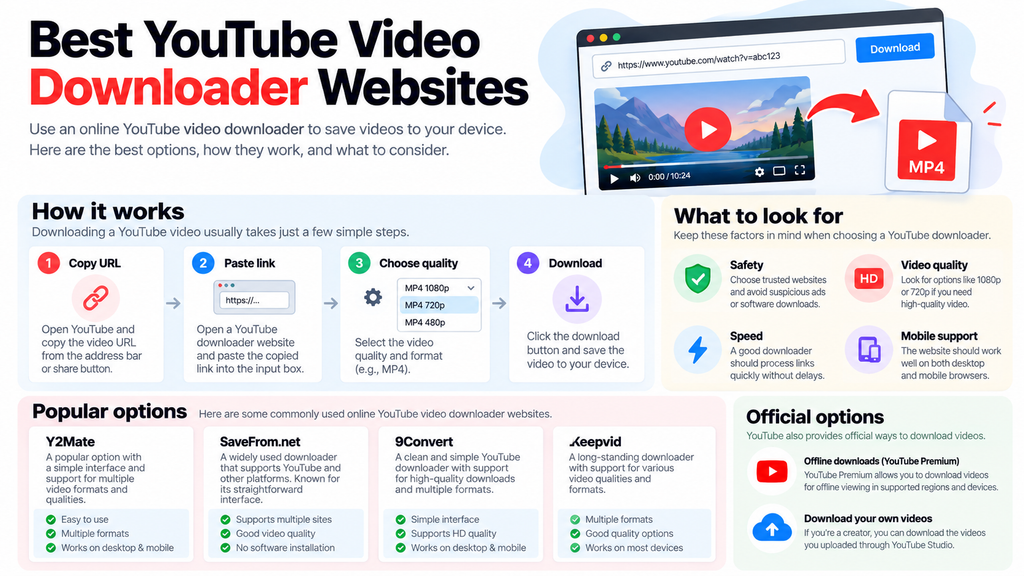
A typical process looks like this:
Copy YouTube URL → Paste URL → Choose format/quality → Download
Unlike desktop applications, online downloaders don’t normally require you to install dedicated software.
Best YouTube Video Downloader Websites
The availability, features, and behavior of third-party downloader sites can change frequently. With that in mind, here are several commonly used options worth knowing about.
1. Y2Mate
Y2Mate is a popular online video downloader that has been used for downloading and converting online videos.
The service focuses on a straightforward URL-based workflow, where users paste a supported video link and select an available format.
Key features:
- Simple browser-based interface
- Multiple output formats
- Video and audio options
- Works on desktop and mobile browsers
- No traditional software installation
Best for: Users looking for a straightforward online downloader.
Third-party guides continue to list Y2Mate among commonly used browser-based video downloaders.
2. SaveFrom.net
SaveFrom.net is a long-running online downloader that supports video downloading from multiple platforms.
Its broader platform support can make it useful if you occasionally download content from websites other than YouTube.
Key features:
- Supports multiple platforms
- Browser-based workflow
- Simple URL input
- Different download options
- Works across common devices
Best for: Users who want a downloader that supports more than one platform.
3. 9Convert
9Convert is an online YouTube downloader focused on a relatively simple conversion process.
Depending on the current service configuration, users can paste a YouTube URL and select an available video quality or format.
Key features:
- Simple interface
- YouTube-focused workflow
- Multiple quality options
- No traditional desktop installation
- Mobile-browser support
Best for: Users who primarily want to download YouTube videos through a browser.
Recent third-party comparisons list 9Convert as a YouTube-focused downloader with support for downloads up to 1080p.
4. Keepvid
Keepvid is another name commonly associated with online video downloading.
The service has historically supported different video sources and formats, although the exact supported websites and available features can change.
Key features:
- Multiple video formats
- Browser-based access
- Different quality options
- Support for multiple devices
Best for: Users looking for a broader online video-downloading service.
How to Download a YouTube Video Online
The exact interface varies between websites, but the basic process is usually similar.
Step 1: Copy the YouTube Video URL
Open YouTube and find the video you want to download.
Click Share → Copy link, or copy the URL directly from your browser’s address bar.
Step 2: Open a YouTube Downloader
Open the online downloader you’re using in another browser tab.
Step 3: Paste the URL
Paste the YouTube URL into the downloader’s input field.
Step 4: Choose the Format and Quality
Depending on the service, you may see options such as:
- MP4
- 360p
- 480p
- 720p
- 1080p
- Audio-only formats
Choose the option that fits your needs.
Step 5: Download the File
Click the download button and save the resulting file to your device.
What Should You Look for in a YouTube Downloader?
Not all downloader websites provide the same experience. Before using one, consider the following factors.
1. Video Quality
If you need a high-quality copy, look for a service that provides appropriate resolution options such as 720p or 1080p.
Keep in mind that a downloader cannot improve the quality of the original video. If the source is only available in 480p, downloading it as “1080p” doesn’t create genuine 1080p detail.
2. Download Speed
A good downloader should process supported URLs without unnecessary delays.
Download speed can also depend on your internet connection, the size of the video, and the service’s current server load.
3. Ease of Use
The best online tools generally have a simple interface:
Paste → Select → Download
You shouldn’t need to create an account or navigate through complicated settings for a basic download.
4. Mobile Compatibility
If you primarily use a smartphone, make sure the downloader works properly in your mobile browser.
5. Safety
This is particularly important with free downloader websites.
Be cautious of websites that:
- Open repeated pop-ups
- Redirect you to unrelated pages
- Ask for your Google password
- Require unknown browser extensions
- Ask you to install suspicious software
- Display misleading “Download” buttons
Are Online YouTube Downloaders Safe?
There isn’t a universal answer because third-party websites operate independently and their advertising, domains, and functionality can change.
Use basic precautions whenever you visit one.
Never enter your Google or YouTube password into a third-party downloader.
You also shouldn’t install an unknown application simply because a downloader tells you that it’s required.
If a website produces multiple pop-ups or redirects, close the unwanted pages rather than clicking through them.
Can You Download YouTube Videos Without Software?
Technically, browser-based downloader websites are designed to provide a way to process URLs without requiring traditional desktop software.
However, there’s an important distinction between third-party downloaders and YouTube’s own download functionality.
YouTube officially supports offline downloads through YouTube Premium in supported locations. Downloaded videos are intended for offline playback within YouTube rather than as ordinary MP4 files that you can freely move around your device.
Official Ways to Download YouTube Videos
If your goal is simply to watch YouTube videos offline, you may not need a third-party downloader at all.
YouTube Premium
YouTube Premium allows eligible users to download videos for offline viewing through YouTube. On supported browsers, YouTube says Premium members can download videos from the watch page and access them from the Downloads section.
On mobile, downloaded videos remain available through the YouTube app and have offline-playback limitations.
Download Your Own YouTube Videos
If you’re the creator of the video, YouTube provides an official download option through YouTube Studio.
YouTube says creators can download their own uploaded videos as MP4 files, with the available resolution depending on the video. You can also use Google Takeout to download all videos you’ve uploaded.
This is the safest option when you’re trying to retrieve your own content.
YouTube Downloader vs. YouTube Premium
| Feature | Third-Party Downloader | YouTube Premium |
| Browser-based | Usually | Yes |
| Requires installation | Usually no | No |
| Offline viewing | Depends on tool | Yes |
| Official YouTube feature | No | Yes |
| Downloads your own uploaded videos | Varies | Yes, through Studio |
| Saves normal MP4 file | Depends on service | Not for ordinary Premium offline downloads |
| Account required | Usually no | Yes |
If you simply want to watch videos offline, YouTube Premium provides the official route. If you need an actual video file of content you own, YouTube Studio provides an official download method.
What Video Formats Can You Download?
Different services may provide different formats.
MP4
MP4 is one of the most widely supported video formats and is generally a practical choice for playback across phones, computers, and other devices.
WebM
Some services may provide WebM files. WebM is commonly used for web video but may not have the same compatibility as MP4 across every device and application.
MP3
Some downloader websites also offer audio extraction. This creates an audio file rather than a video file.
Whether you’re allowed to extract or download the audio depends on the rights associated with the content.
Is Downloading YouTube Videos Legal?
This depends on the content, how you’re using it, the permissions provided by the copyright owner, and the applicable terms and laws.
Downloading a video does not transfer copyright ownership to you.
For example, downloading someone else’s copyrighted video and re-uploading it to your own channel could create copyright and platform-policy problems.
Safer examples include:
- Downloading videos you’ve created yourself
- Downloading content explicitly offered for download
- Using content released under an appropriate license
- Using YouTube’s official offline features for personal viewing
If you’re unsure whether you have permission to download or reuse a particular video, check the creator’s licensing terms.
Common YouTube Downloader Mistakes
Choosing the Highest Resolution Automatically
Higher resolution means larger files.
If you’re watching on a phone, 1080p may not always be necessary. For archiving or editing, however, higher resolution may make more sense.
Clicking Fake Download Buttons
Some free downloader sites use advertising that resembles the actual download button.
Look carefully before clicking and avoid unexpected downloads.
Installing Unknown Software
A browser-based service shouldn’t require you to install suspicious software just to process a URL.
Downloading Content You Don’t Have Rights To
Being technically able to download a video doesn’t necessarily mean you’re legally allowed to reuse it.
Always consider copyright and the creator’s permissions.
Frequently Asked Questions
What is the best YouTube video downloader website?
There isn’t one universal best option. Y2Mate, SaveFrom.net, 9Convert, and Keepvid are among the names commonly associated with online video downloading, but features and availability can change.
Can I download YouTube videos for free?
Some third-party websites offer free downloading, while YouTube itself provides official offline viewing through Premium and, in some regions, certain videos can be downloaded directly through the YouTube app.
Can I download YouTube videos on my phone?
Some browser-based services are designed to work on mobile browsers. YouTube also provides official offline downloads through its mobile app in supported locations.
Can I download my own YouTube videos?
Yes. YouTube Studio allows creators to download videos they’ve uploaded. YouTube also supports Google Takeout for downloading uploaded videos.
Can I download someone else’s YouTube video?
Third-party sites may technically process some publicly accessible URLs, but that doesn’t mean you have permission to download or reuse the content. YouTube’s official help states that you can’t download other users’ videos through its own Studio download feature.
What is the best quality for downloading a YouTube video?
When available and permitted, 1080p is a practical choice for many uses. However, the best option depends on your intended use, available source quality, and storage space.
Final Thoughts
YouTube video downloader websites can be convenient when you need to save content you’re authorized to download. Tools such as Y2Mate, SaveFrom.net, 9Convert, and Keepvid offer browser-based approaches, while YouTube itself provides official offline viewing through Premium and official downloads for videos you’ve uploaded.
When choosing a downloader, prioritize safety, video quality, speed, ease of use, and device compatibility. Most importantly, remember that downloading a video doesn’t give you the right to redistribute or commercially use it.
If your goal is simply offline viewing, YouTube’s own download functionality is the safest and most straightforward option. If you’re retrieving your own content, YouTube Studio is the official way to download your uploaded videos.