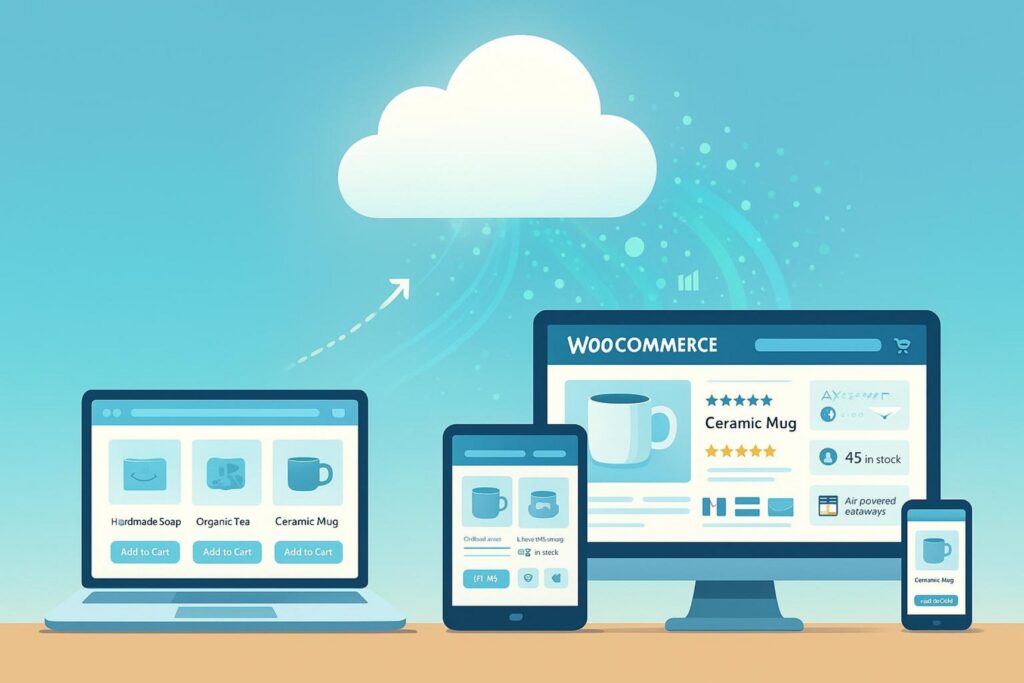
As a WooCommerce store grows from a small shop into a busy online business, you will run into a simple problem: you have more files, more customers, and more traffic to handle. A clear answer to this is cloud storage. Cloud storage gives WooCommerce stores a reliable way to grow without running out of space or slowing down. It helps you store large files elsewhere, speed up your site, and keep things stable during big traffic jumps.
Most providers now offer flexible entry-level plans, so businesses can test different storage setups without committing too early. Secure cloud storage options are especially useful during the early stages of scaling, because they can protect product images, invoices, internal documents, and routine backups while keeping files easy to access for the team.
WooCommerce is built to scale. It can run on anything from a basic server to large cloud setups that process millions of orders. Shani Banerjee’s “Scaling with WooCommerce” (August 22, 2024) points out that store owners can keep control of their code, data, and hosting choices. That freedom is great, but it also means your needs will change as you hit new growth stages. This is where cloud storage can remove common bottlenecks and help you keep growing.
What Is Cloud Storage and How Does It Integrate with WooCommerce?
Cloud storage is a way to store data where your files live in online “pools” across many servers (often in different places). These servers are usually owned and managed by a third-party provider.
For an online store, that means product photos, videos, digital downloads, and other large files do not have to live only on your main web server. Instead, they can sit on a separate network built for storing and delivering files.
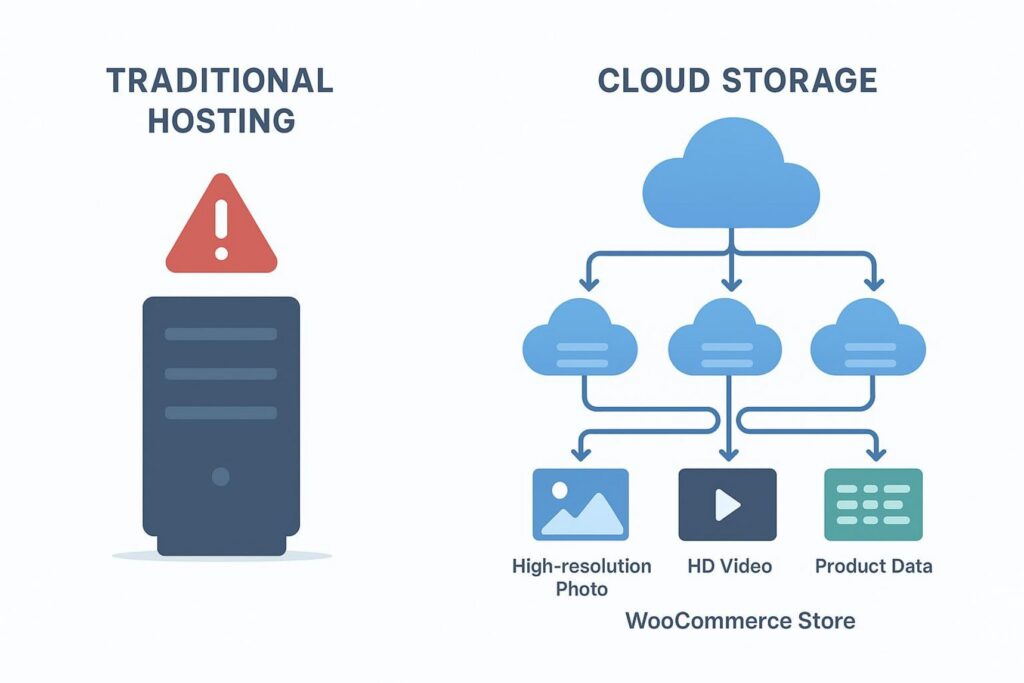
This setup has clear benefits. Traditional hosting depends on one server with limited resources. Cloud storage can expand or shrink as needed, which works well for e-commerce stores where traffic and file usage can change quickly. Cloud systems also usually include high availability and redundancy, meaning your data is copied across more than one location. This lowers the risk of downtime or lost files if hardware fails. Many cloud providers also include security features like encryption and compliance options to help protect customer and business data.
Key Features of Cloud Storage for Online Stores
Here are the cloud storage features that matter most for WooCommerce stores:
- Scalability: Storage can grow as your catalog and media library grow. You don’t have to keep upgrading disks or moving servers. Many services use “pay for what you use” pricing, so smaller stores can start small.
- Better performance: Media can be served through a CDN connected to cloud storage, which speeds up loading for customers in different locations. A product page with many high-quality images can still load quickly.
- Redundancy and durability: Providers often store multiple copies of your files across different servers and data centers. This protects against hardware issues, disasters, or accidental deletion.
- Security and compliance: Common tools include encryption (in transit and at rest), access controls, and compliance support for handling sensitive e-commerce data.
Integrating Cloud Storage with WooCommerce: Common Approaches
Most WooCommerce + cloud storage setups focus on media files and digital products.
A very common option is offloading your media library. Instead of keeping all images, videos, and static files on your WordPress hosting server, you move them to a cloud storage provider like Amazon S3, Google Cloud Storage, or Cloudflare R2. This reduces strain on your main server, leaving it more resources for your database and checkout actions.
Rodolfo Melogli (Business Bloomer, last revised February 2025) notes that moving media to a service like Amazon S3 “immediately removes the bulk of the data from the hosting server.”
Plugins can make this process straightforward. For example, the Amazon S3 Storage for WooCommerce plugin supports storing downloads in S3. Kestrel (the company that acquired the plugin) shared on June 23, 2025 that it added automatic offloading for WooCommerce product downloads to S3 buckets.
When enabled, downloadable files attached to products are uploaded to S3 when you save the product. Downloads can then be delivered using pre-signed, time-limited S3 URLs, which reduces load on your host and improves reliability. This is especially helpful for stores selling digital products like courses, videos, or large software files.
Cloud storage is also widely used for backups and disaster recovery. Many WooCommerce backup tools can send backups (database + files) to cloud storage automatically. That gives you an off-site copy of your store so you can restore it faster after an issue.
For developers and larger stores, cloud storage can also support staging environments, helping move large datasets for testing without constantly copying everything to local machines.
Why Do Growing WooCommerce Stores Need Cloud Storage?
Growing a WooCommerce store is exciting, but it also creates stress on your hosting setup. More products, more visitors, and more orders mean more work for your server. At some point, regular hosting limits start to show. Cloud storage becomes less of a “nice extra” and more of a practical requirement for steady growth.
Think about a flash sale or holiday rush. These are great moments for revenue, but they can also cause slow pages or errors if your server can’t keep up. Cloud storage helps strengthen your store so it can handle these peaks with fewer problems.
Challenges of Scaling a WooCommerce Store
Scaling a WooCommerce store usually brings these problems:
- More data: Larger catalogs (with variations), more customers, and more orders can make the database heavy. This can slow queries and make the site feel sluggish. Ashish Thakur (BrihaspatiTech, June 5, 2024) explains that scaling means handling growth without hurting performance or customer experience.
- Traffic spikes: Promotions, social posts, and seasonal shopping can bring many visitors at once. Shared hosting often can’t handle this. Overloaded servers can lead to “502 Bad Gateway” errors or downtime. Christopher Jones (WooCommerce.com, April 24, 2026) says that a slowdown or crash during a promotion-even once-can be a sign you’ve outgrown your host.
- More moving parts: More plugins and features can increase server load and create conflicts. Keeping performance and security solid gets harder as your store grows.

File Management Issues as Sales and Catalogs Expand
File management becomes a fast problem as you add more products. Each product can have several images, sometimes videos, and for digital items, downloadable files. Multiply that across thousands of products and your uploads folder can become huge.
Business Bloomer gives an example of a store with a 2.5GB database and 20GB of files. At that size, many tasks get harder: backups take longer, staging is harder, and migrations can fail. Storing everything on the main server also uses disk space and slows the site. When customers open product pages, the server has to deliver large media files again and again, which can create a bottleneck.
Cloud storage helps because it is built to store and serve static assets at scale. When you offload files, your main server can focus on checkout, search, and database work. This “split the jobs” approach is a common pattern for websites that need to grow.
Limitations of Local Hosting for Large-Scale WooCommerce Sites
Standard hosting can work early on, but it hits limits as you grow:
- Limited resources: One server has fixed CPU, RAM, and disk performance. More traffic and more data can overwhelm it. Cloud setups can add capacity more easily.
- Distance and slower loading: If your server is far from your customer, loading can be slower. CDNs help, but they work best with cloud-based storage behind them.
- Single point of failure: If your server has a hardware failure or outage, your store can go offline. Cloud systems usually have redundancy built in. Pantheon points out that uptime and reliability should be top priorities, since every second of downtime can mean lost sales.
- More work for your team: Security, backups, and server maintenance can take time and technical skill on traditional hosting, pulling focus away from running the business.
How Cloud Storage Improves WooCommerce Store Performance
Performance keeps e-commerce stores alive. Slow pages frustrate shoppers, raise bounce rates, and can hurt search rankings. As WooCommerce stores grow, performance becomes harder to keep steady. Cloud storage helps by changing how your store delivers files and handles traffic.
Cloud storage works well because it separates large static files (images, videos, downloads) from your main application server. That reduces load where it matters most. For businesses handling sensitive customer data, consider encrypted cloud storage solutions like Proton, which combines performance with end-to-end encryption to protect payment information, customer records, and proprietary product files.
Faster Load Times for Product Images and Downloads
The quickest win is faster loading for images and downloads. High-quality product images are often large. When these files are stored in cloud storage and served through a CDN, they can be cached in locations around the world.
So when a customer visits your store, images load from a server close to them, which reduces delay. Kestrel’s post about Amazon S3 for WooCommerce mentions that Transfer Acceleration (enabled through the AWS SDK for PHP 3.2.0+) uses Amazon’s edge network to speed up delivery for international customers. For digital downloads, cloud storage can also deliver big files more reliably because it is built for high data transfer.
Offloading Media from Main Server: Impacts on Speed
Offloading media does more than speed up images-it helps your whole site. Your WordPress server runs PHP, talks to the database, and serves files. If your media library grows very large, the server spends a lot of time handling static content.
Moving those files to cloud storage frees up server resources. That means PHP workers and CPU time can focus on dynamic tasks like search, cart updates, and checkout.
Christopher Jones highlights how important PHP workers and caching are as stores grow; without good caching, PHP workers must fetch content on every request, which slows everything down.
Offloading media supports that by reducing the overall work your server must do. Store owners often also notice the admin area runs faster, which matters once you have thousands of products and orders.
Reducing Downtime During Traffic Spikes
Traffic spikes can overload a single server and cause errors or downtime. That leads to lost sales and unhappy customers.
Cloud platforms are built to handle sudden demand by spreading load across systems and adding resources when needed. Pantheon, for example, runs on Google Cloud and offers scaling and performance tuning that adjusts for traffic surges. It also offers DDoS protection by distributing traffic across servers.
With cloud storage (and often cloud hosting alongside it), WooCommerce stores can run promotions with more confidence and less risk of the site going down.
Improving Scalability and Flexibility with Cloud Storage
A “growing store” needs a setup that can adapt. You may add more products, run bigger campaigns, or start selling in more countries. Cloud storage supports that long-term growth by removing storage limits and helping your site handle larger workloads.
This is not only about fixing current issues-it’s about building a base that can support what you do next.
Easy Vertical and Horizontal Scaling
There are two common ways hosting scales:
- Vertical scaling: upgrade one server (more RAM, CPU, storage). This works up to a point, but it can hit limits and may require downtime.
- Horizontal scaling: add more servers (nodes) and spread the load.
Cloud storage helps most with horizontal scaling. Shani Banerjee explains that horizontal scaling matters when a business grows to around “100k-200k orders per month or per day,” since you can handle more traffic by adding nodes. When static files are stored in cloud storage, new nodes can access the same files right away without copying huge media folders onto each server.
Auto-Scaling Capabilities Based on Store Growth
Many cloud platforms support auto-scaling. This means the system can add resources during high demand and reduce them when traffic drops. This helps performance and can control costs.
Traditional hosting is usually static. You either pay for extra power you rarely use, or you risk crashes during spikes. Pantheon notes that cloud hosting is often the best choice for scaling because it can adjust based on traffic changes. For WooCommerce stores with seasonal demand or unpredictable surges, this is very useful.
Supporting Global Sales with Multi-Region Storage
If you sell internationally, storing files in one place can slow down the site for customers far away. Cloud providers run data centers around the world, and CDNs can serve files from the nearest location.
Kestrel mentions that features like Amazon S3 Transfer Acceleration use an edge network to speed up delivery for international customers. Faster loading can lead to better shopping experiences and higher conversion rates. Multi-region setups can also help with data rules in different countries.
Securing WooCommerce Data with Cloud Storage Solutions
Security is a basic requirement for e-commerce. Growing WooCommerce stores handle more customer data and more orders, which makes them bigger targets. Cloud storage providers often offer security tools that many small businesses would struggle to build and maintain on their own.
This section explains how cloud storage helps protect your store from data loss, hacks, and compliance problems.
Automatic Backups and Rapid Recovery
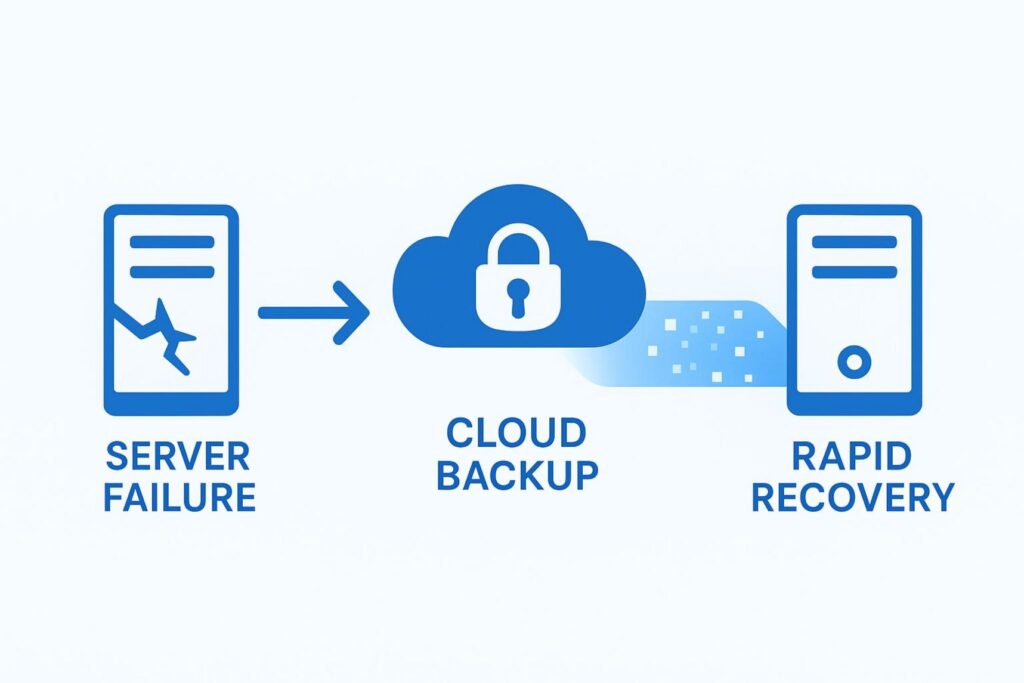
Data loss can happen from server failures, attacks, or human mistakes. Cloud storage supports automated backups that are stored off-site. Many managed WooCommerce hosts (including Nexcess, Pantheon, and SiteGround) offer daily backups. Cloudways also promotes backup and restore features, including manual backups and restoring older versions.
Cloud storage can also speed up recovery. If something goes wrong, having your site’s backups stored in the cloud can shorten restore time and reduce downtime. Since cloud storage often keeps redundant copies across locations, your backups may still be safe even if one data center has a problem.
Data Encryption and Compliance Features
Cloud providers often support encryption:
- In transit: protects data moving between your site and the storage service.
- At rest: protects data stored on the provider’s servers.
Many providers also support compliance programs like SOC 2, GDPR, and PCI DSS. For WooCommerce stores that must show compliance (especially larger ones), this matters. Christopher Jones notes that enterprise stores often treat SOC 2, GDPR, and PCI documentation as required. Cloud hosts like Pantheon also include security tools like DDoS protection, HTTPS certificates, and web application firewalls.
Protecting Customer and Transaction Data
WooCommerce stores handle personal data (names, addresses, order details) and transaction information (often through payment gateways). Cloud-backed infrastructure adds extra layers of protection because cloud providers invest heavily in security teams, monitoring, audits, and detection systems.
Using SSL/HTTPS (common with cloud hosts) encrypts traffic between the shopper and your site, which helps prevent interception. This kind of layered protection supports customer trust and lowers legal and reputation risks.
What Cloud Storage Options Are Best Suited for WooCommerce?
Picking a cloud storage provider affects speed, scaling, security, and cost. Even though “cloud storage” sounds like one thing, providers differ a lot in pricing, features, and how easy they are to connect with WooCommerce.
This section looks at common options and what to check before choosing.
Comparing Amazon S3, Google Cloud Storage, and Others
For object storage, Amazon S3 is one of the most popular and widely supported services. It scales well and offers many features, including storage tiers, regional choices, and easy pairing with AWS CloudFront (CDN). The Amazon S3 Storage for WooCommerce plugin uses S3 for download offloading, showing strong compatibility with WooCommerce. Amazon’s Transfer Acceleration can also help deliver files faster to international customers.
Google Cloud Storage offers similar benefits: strong durability, global access, and connections to the wider Google Cloud platform. It can be a good fit for teams already using Google services.
There are also S3-compatible providers like Cloudflare R2, Wasabi, and Backblaze B2. Kestrel points out that these services can offer lower storage and transfer costs than Amazon, sometimes with no egress fees or flat pricing. This can matter for stores that serve lots of images and downloads. Kestrel also notes that support for these providers in the plugin is currently experimental and mainly through Shortcode use, but it shows the direction the market is going: more choice, and often lower costs.
Factors to Consider When Choosing a Provider
Here are key points to compare:
| Factor | What to check | Why it matters for WooCommerce |
| Cost structure | Storage size, transfer fees (egress), API request costs | Media-heavy stores can get surprised by transfer fees |
| Performance and global reach | Data center locations, CDN support, edge networks | Faster load times for shoppers in different countries |
| Security and compliance | Encryption, access controls, SOC 2/GDPR/PCI support | Helps protect customer data and meet requirements |
| Integration | Plugins, setup steps, API documentation | Easier setup and fewer errors during growth |
| Support and docs | Response times, clear guides, community help | Helps when something breaks or needs tuning |
| Scaling and flexibility | Pay-as-you-go, fits auto-scaling hosting | Lets you grow without rebuilding your setup |
| Vendor lock-in | Portability, S3 compatibility, open standards | Makes it easier to switch providers later |
If you compare providers using these points, you’re more likely to choose one that fits your store today and still fits after your next growth jump.
Optimizing Your WooCommerce Store with Cloud Storage Best Practices
Using cloud storage is a good start, but you get the best results when you set it up in a smart way and keep it running efficiently. That means automation, caching, and monitoring.
These steps help turn cloud storage into a practical tool that supports growth.
Automating Media Offloading and Management
Manually moving files does not scale well. A better approach is to automate offloading with plugins and rules. Tools like Amazon S3 Storage for WooCommerce (and similar tools for other providers) are built for this job. As mentioned earlier, Kestrel’s updates support automatic offloading of downloadable products when they are saved, which reduces strain on your main host.
Automation should cover new uploads too. Ideally, when you add a new image to WordPress, it should be copied to cloud storage and served from there. Many setups also remove the local copy (or keep a small placeholder) and update URLs to point to the cloud version. For older stores, plugins often include bulk tools to offload existing media. It also helps to review storage sometimes and delete unused files to keep costs under control.
Improving Caching Strategies for Large Stores
Cloud storage works best with good caching. Cloud storage handles static assets, while caching reduces repeated work for dynamic content.
Common caching layers include:
- Object caching: Stores database query results in memory (often Redis or Memcached). This reduces database load. Christopher Jones notes that without object caching, PHP workers will fetch content repeatedly and slow the site down.
- Full page caching: Saves rendered HTML for pages that do not change per user. You usually cannot cache cart/checkout/account pages, but product and category pages often benefit a lot.
- CDN caching: A CDN can cache static files and, with careful setup, sometimes cache other content too, reducing load on your origin server.
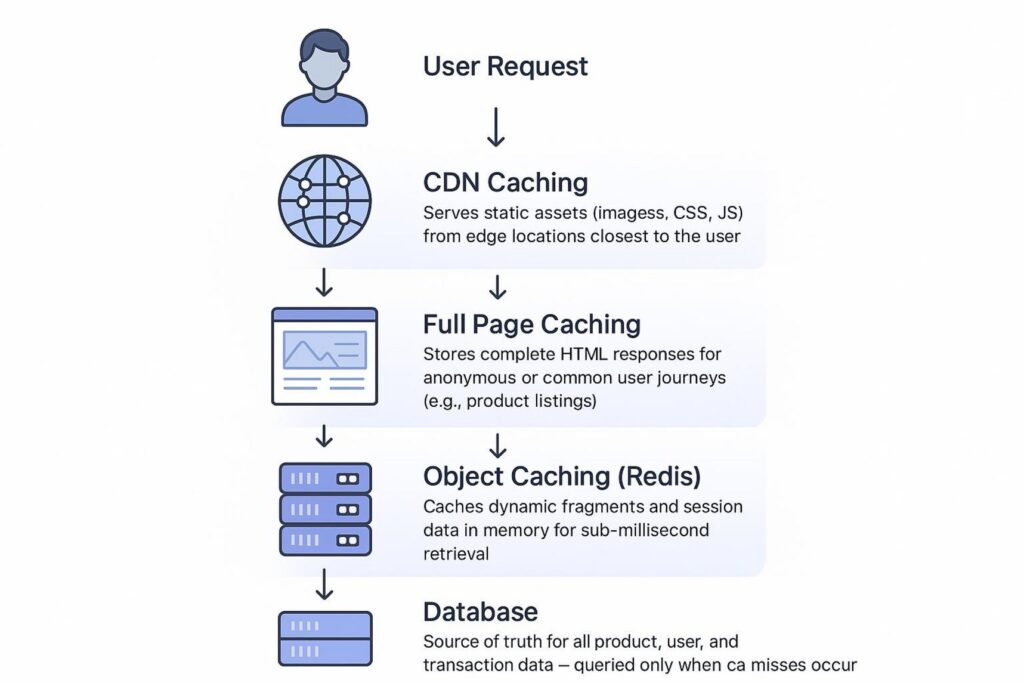
BrihaspatiTech explains that advanced caching becomes more important for large stores because it reduces server load and improves response times.
Testing Performance and Troubleshooting Storage Issues
Regular testing helps you spot problems early. Use performance tools like Google PageSpeed Insights, GTMetrix, and monitoring tools like New Relic or Query Monitor (BrihaspatiTech mentions profiling tools for finding slow spots). Run tests before and after major changes to plugins, themes, or storage settings.
If you have storage-related problems, you might see:
- images loading slowly or not at all
- broken media links
- download failures for digital products
Start by checking the cloud provider’s status page and usage alerts. Then check WooCommerce System Status. If you use a plugin like Amazon S3 Storage for WooCommerce, it may include diagnostics (Kestrel added a System Status section in version 3.0.5 with S3 credentials, bucket, and region info). Review logs for failed requests or API errors. For S3-compatible providers, confirm your endpoint and authentication settings. Shani Banerjee notes that sometimes you don’t need a bigger server-you need to find the one piece causing the slowdown.
Final Tips for Using Cloud Storage to Support WooCommerce Growth
Cloud storage can support long-term WooCommerce growth, but it works best as an ongoing plan, not a one-time change. These last tips help keep your setup aligned with your store as it grows.
Regularly Audit Storage and Performance Needs
Your store will keep changing. New products, new content, and new traffic patterns can make today’s setup less efficient later. Review your storage usage, performance metrics, and costs regularly. Watch for unexpected transfer charges, and track real store metrics like page speed, TTFB (time to first byte), and bounce rate.
Use what you learn to make decisions. If you are still hitting limits, you may need stronger hosting or better scaling. If old files are sitting unused in cloud storage, remove them to lower costs. Regular checkups help you avoid major problems later.
Plan for Future Growth and Feature Expansion
WooCommerce is flexible, and cloud storage makes it easier to support bigger plans. Think about what you may add next: video demos, large downloadable bundles, a mobile app that pulls product media, or new countries and regions with their own rules. Shani Banerjee highlights WooCommerce’s open-source flexibility and how it supports growth.
With cloud storage as part of your base setup, you can add features and expand without being boxed in by server limits. A good cloud storage plan today supports better speed, stability, and room to grow later.