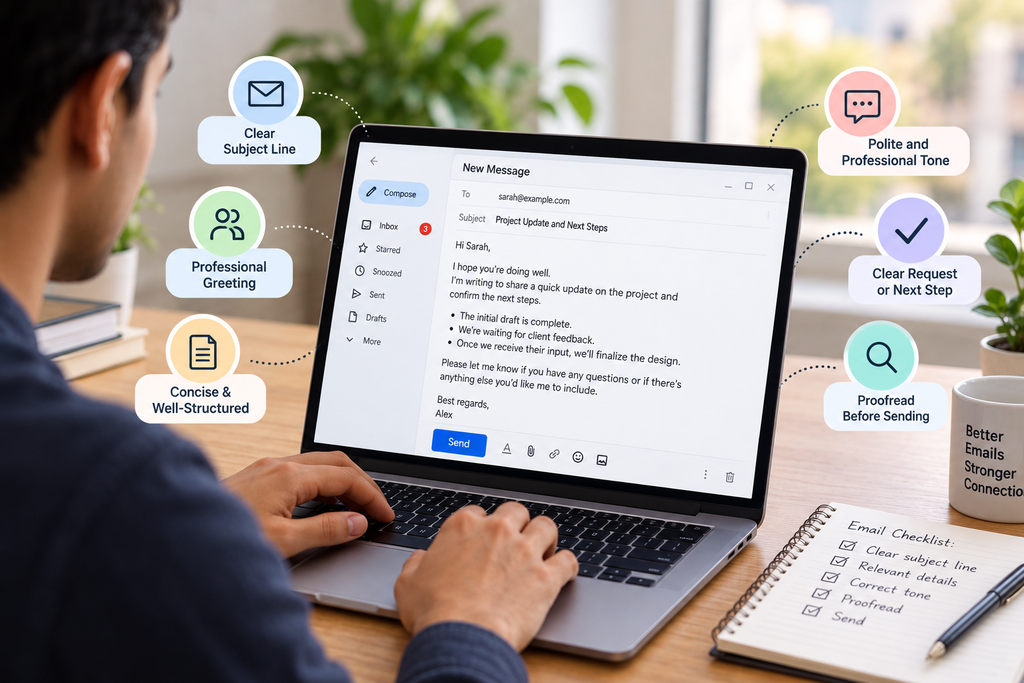
Email remains one of the most widely used methods of professional communication. Whether you’re contacting a colleague, following up with a client, applying for a job, or reaching out to a business partner, the way you write an email can influence how your message is understood and received.
However, effective email correspondence involves more than simply writing a message and clicking Send. A well-written email should have a clear purpose, an appropriate tone, a useful subject line, and a specific next step when necessary.
Poorly written emails can lead to misunderstandings, unnecessary follow-ups, and wasted time. On the other hand, clear and professional email communication helps build trust, improve collaboration, and make everyday interactions more efficient.
In this guide, you’ll learn the best practices for effective email correspondence, explore examples of professional email writing, and discover practical ways to make your messages clearer and more impactful.
What Is Email Correspondence?
Email correspondence refers to the exchange of messages between two or more people through email. It can involve professional, academic, business, or personal communication.
In a professional setting, email correspondence is commonly used to share information, request assistance, schedule meetings, provide updates, confirm agreements, and maintain relationships with clients or colleagues.
For example, email correspondence might include:
- Sending a project update to your manager.
- Responding to a customer’s question.
- Requesting information from a business partner.
- Following up on an unanswered email.
- Confirming the details of a meeting.
- Sending a formal application or business proposal.
Although the purpose of each email may differ, the underlying goal remains the same: to communicate information clearly and appropriately.
Why Is Effective Email Correspondence Important?
Effective email communication helps people exchange information without unnecessary confusion. It also creates a written record that recipients can refer to when needed.
Here are some of the main benefits of following good email correspondence practices.
1. Improves Clarity
A clear email helps the recipient understand your message without having to ask for additional explanations. Organizing your thoughts and stating your purpose early makes communication more efficient.
2. Creates a Professional Impression
Your emails often represent you before you have an opportunity to speak with someone directly. Proper grammar, a respectful tone, and organized formatting demonstrate attention to detail.
3. Saves Time
Messages that clearly explain the issue, provide the necessary context, and specify the next step reduce unnecessary back-and-forth communication.
4. Builds Trust and Relationships
Consistent, respectful communication helps maintain positive relationships with colleagues, clients, customers, and business partners.
5. Provides a Written Record
Email correspondence allows you to review previous conversations, track decisions, and confirm important details. This can be particularly useful when managing projects, deadlines, or business agreements.
10 Best Practices for Effective Email Correspondence
Following a few simple principles can significantly improve the quality of your emails. Use these best practices whenever you write a professional message.
1. Use a Clear and Relevant Subject Line
The subject line gives recipients an immediate idea of what your email is about. A specific subject makes it easier to prioritize messages and find them later.
Avoid vague subject lines such as:
- Hi
- Important
- Quick question
- Please read
Instead, describe the purpose of your message.
Examples of effective email subject lines:
| Purpose | Example subject line |
|---|---|
| Requesting information | Request for Project Details |
| Following up | Follow-Up on Proposal Sent October 20 |
| Scheduling a meeting | Meeting Request for Next Week |
| Sharing an update | Weekly Project Progress Update |
| Applying for a job | Application for Digital Marketing Executive |
| Requesting action | Approval Needed for Campaign Budget |
A good subject line is concise, relevant, and specific enough to help the recipient understand what to expect.
2. Start With an Appropriate Greeting
Choose a greeting based on your relationship with the recipient and the formality of the situation.
For formal business correspondence, you can use:
- Dear Mr. [Last Name],
- Dear Ms. [Last Name],
- Dear Dr. [Last Name],
- Dear [Full Name],
For routine workplace communication, these options may be more appropriate:
- Hi [First Name],
- Hello [First Name],
- Good morning, [First Name].
If you’re contacting someone for the first time and aren’t sure how formal to be, a polite professional greeting is a safe choice.
Avoid overly casual greetings in situations that require formality, and make sure you spell the recipient’s name correctly.
3. State Your Purpose Early
One of the most important email writing principles is to get to the point. Recipients should not have to read several paragraphs before discovering why you’re contacting them.
Start with a brief sentence explaining your purpose.
Instead of:
“I hope you are doing well. I wanted to reach out because we had a discussion some time ago, and I was thinking about the information we exchanged regarding the upcoming project.”
Try:
“I’m writing to follow up on our discussion about the upcoming project and confirm the next steps.”
The second version communicates the purpose immediately while maintaining a professional tone.
If some background information is necessary, provide it after the opening sentence.
4. Keep Your Message Concise and Organized
Long, unstructured emails can make important information difficult to find. Focus on the details the recipient needs to understand and respond.
To improve readability:
- Keep paragraphs short.
- Use bullet points when listing several items.
- Separate different topics into distinct paragraphs.
- Remove unnecessary repetition.
- Highlight deadlines or action items when appropriate.
For example, instead of writing one long paragraph about a meeting, organize the information into a short introduction followed by the date, time, and agenda.
Concise writing doesn’t mean leaving out important information. It means communicating everything necessary without adding unnecessary details.
5. Maintain a Professional and Respectful Tone
Your tone can influence how a message is interpreted, particularly when you’re making a request, addressing a problem, or following up on a delayed response.
Use courteous language without making your message unnecessarily complicated.
For example:
Too demanding: “Send me the report today.”
More professional: “Could you please send me the report by the end of today?”
Similarly, if someone hasn’t responded to your previous email, avoid assuming that they’re deliberately ignoring you.
You could write:
“I wanted to follow up on my previous email regarding the report. When you have a moment, could you please share an update?”
A respectful tone helps you communicate firmly when necessary without creating unnecessary tension.
6. Make Your Request or Next Step Clear
If you need the recipient to take action, explain exactly what you need them to do.
A message that provides information without clarifying the expected next step may lead to confusion.
For example:
“Please review the attached proposal and share your feedback by Friday so we can finalize the project plan.”
This sentence explains three things:
- What the recipient needs to do.
- Which document they need to review.
- When the response is required and why.
If you’re asking a question, make sure it is easy to identify. If you’re requesting approval, specify what needs to be approved.
7. Proofread Before Sending
Spelling errors, incorrect names, missing attachments, and unclear sentences can undermine an otherwise professional email.
Before clicking Send, review your message for:
- Spelling and grammar mistakes.
- The correct recipient and email address.
- An appropriate subject line.
- Accurate dates, names, and figures.
- Attachments mentioned in the message.
- A clear request or conclusion.
- An appropriate closing and signature.
Reading your email once from the recipient’s perspective can help you identify anything that might be confusing.
For important business communication, take extra time to verify factual details before sending.
8. Use CC and BCC Appropriately
The CC and BCC fields help you manage email recipients, but they should be used thoughtfully.
CC (Carbon Copy): Use this field when additional people need visibility into the conversation but aren’t the primary recipients.
BCC (Blind Carbon Copy): Use this field when recipients should not see one another’s email addresses, such as when sending an appropriate announcement to a large group.
Before adding someone to an email, consider whether they need the information. Including unnecessary recipients can create clutter and expose information to people who don’t need it.
For sensitive conversations, pay particular attention to recipient lists and privacy.
9. Respond Within a Reasonable Time
Timely responses help maintain productive communication. When possible, acknowledge important messages and respond within the timeframe expected in your workplace or relationship.
If you need additional time to prepare a complete answer, a brief acknowledgment can help.
For example:
“Thanks for sharing the details. I’ll review the information and get back to you by Thursday.”
If you cannot meet the expected deadline, communicate that early and provide a realistic alternative when possible.
Remember that not every email requires an immediate response. Prioritize messages based on urgency, importance, and any agreed deadlines.
10. End With a Suitable Closing and Signature
A professional closing gives your email a clear and courteous ending.
Common options include:
- Best regards,
- Kind regards,
- Sincerely,
- Thank you,
- Best,
Choose a closing that fits the tone of your message. “Sincerely” is suitable for many formal emails, while “Best regards” and “Kind regards” work well for routine professional communication.
Your signature can include your name, job title, company, and relevant contact information.
For example:
Best regards,
[Your Full Name]
SEO Specialist
[Company Name]
[Email Address or Website]
You don’t need a long signature for every message. Include only the information that helps the recipient identify you or contact you.
Professional Email Correspondence Examples
Understanding the principles of email communication is useful, but seeing them in practice makes them easier to apply.
Here are three common email scenarios and examples you can adapt.
Example 1: Requesting Information From a Colleague
Subject: Request for Updated Project Timeline
Hi Sarah,
Could you please share the latest timeline for the website redesign project?
I’d like to review the upcoming milestones and ensure our content deliverables are aligned with the development schedule.
If there have been any changes to the deadlines, please let me know.
Thanks for your help.
Best regards,
[Your Name]
Why it works: The email states the request clearly, explains why the information is needed, and maintains a friendly professional tone.
Example 2: Following Up on an Unanswered Email
Subject: Follow-Up on Partnership Proposal
Hi Michael,
I wanted to follow up on the partnership proposal I shared last week.
I understand you may have a busy schedule, but I’d appreciate any update when convenient. Please let me know if you need any additional information from my side.
Thanks for your time.
Best regards,
[Your Name]
Why it works: It reminds the recipient about the original message without sounding impatient or demanding.
Example 3: Sending a Formal Business Request
Subject: Request for Approval of the Marketing Campaign Budget
Dear Mr. Thompson,
I’m writing to request your approval of the proposed budget for our upcoming marketing campaign.
The budget covers content production, advertising expenses, and campaign reporting. The proposed allocation is outlined in the attached document for your review.
Could you please review the proposal and share your approval or feedback by Friday? This will help us finalize the campaign schedule and coordinate the next steps.
Thank you for your consideration.
Kind regards,
[Your Full Name]
[Job Title]
Why it works: The message provides context, identifies the requested action, includes a relevant attachment, and communicates a reasonable deadline.
Common Email Correspondence Mistakes to Avoid
Even small mistakes can make email communication less effective. Watch out for these common problems.
Writing a Vague Subject Line
A subject such as “Update” doesn’t provide enough context. Specify the project, request, or topic whenever possible.
Including Too Much Information
Avoid lengthy explanations when a few clear sentences will do. If the topic requires extensive detail, summarize the key points in the email and attach a document when appropriate.
Using an Inappropriate Tone
Excessive familiarity, sarcasm, aggressive language, or unnecessary demands can harm professional relationships. Adjust your tone to the recipient and situation.
Sending Emails Without Reviewing Them
Rushing can result in missing attachments, incorrect information, or messages sent to the wrong person. A quick review can prevent avoidable mistakes.
Overusing Follow-Up Messages
Sending repeated reminders within a short period can frustrate recipients. Allow a reasonable response window unless the matter is urgent or a specific deadline requires earlier action.
Using Reply All Unnecessarily
Before selecting “Reply All,” check whether everyone on the thread needs your response. Replying only to the relevant person can reduce inbox clutter.
Forgetting About Email Privacy
Avoid sharing confidential information with people who aren’t authorized to receive it. Double-check recipient addresses, particularly when sending sensitive documents or group emails.
How to Improve Your Email Writing Skills
Effective email correspondence is a skill you can develop with practice. You don’t need complicated vocabulary or elaborate sentences to communicate professionally.
Here are a few ways to improve.
Read Your Email From the Recipient’s Perspective
Ask yourself whether the recipient can understand the purpose, identify the important details, and determine what action is required.
Use Simple, Direct Language
Prefer familiar words and straightforward sentences over unnecessarily formal expressions. Clear language is usually more effective than complicated wording.
Learn Common Professional Email Phrases
Knowing how to phrase requests, reminders, apologies, and follow-ups makes everyday communication easier.
For example:
- “Could you please clarify…” when requesting an explanation.
- “I’m writing to follow up on…” when referring to a previous message.
- “Thank you for bringing this to my attention” when acknowledging a concern.
- “Please let me know if you need any additional information” when offering assistance.
- “I appreciate your time and consideration” when closing a formal request.
Use these phrases naturally rather than adding them to every email.
Create Templates for Repeated Situations
If you frequently send similar messages, prepare templates for meeting requests, project updates, follow-ups, and customer inquiries.
Templates save time and help maintain consistency. However, personalize each message so it reflects the recipient, context, and purpose.
Use Writing Tools Thoughtfully
Grammar checkers and AI writing assistants can help identify errors, improve clarity, and suggest alternative wording.
However, review their suggestions before sending your email. Ensure that the final message accurately reflects your intentions and doesn’t disclose confidential information unnecessarily.
Email Correspondence Checklist Before Sending
Use this checklist as a final review for important professional emails.
- The subject line clearly communicates the topic.
- The greeting suits the recipient and situation.
- The purpose is stated early.
- The message includes the necessary context.
- The tone is professional and respectful.
- The requested action or next step is clear.
- Spelling, grammar, names, and dates are correct.
- All referenced attachments are included.
- The recipient list is appropriate.
- The closing and signature are suitable.
Taking a moment to review these points can help you avoid common communication mistakes.
Frequently Asked Questions
What are the best practices for email correspondence?
The most important practices include using a clear subject line, starting with an appropriate greeting, stating your purpose early, keeping the message organized, maintaining a professional tone, making requests specific, proofreading, and responding within a reasonable timeframe.
How do you write an effective professional email?
Begin with a relevant subject line and greeting. Explain why you’re writing, include the necessary details, and state what you need from the recipient. End with a courteous closing and review your email before sending it.
How long should a professional email be?
A straightforward professional email may require only a few sentences, while complex topics need more context. Aim to include all essential information without unnecessary repetition. The right length depends on the purpose and the recipient’s needs.
What is the difference between email etiquette and email correspondence?
Email correspondence refers to the exchange of email messages. Email etiquette refers to the conventions and practices that make those exchanges professional, respectful, and effective.
How quickly should you respond to a professional email?
Respond according to the urgency of the message, your workplace expectations, and any stated deadlines. If you need more time to provide a complete answer, acknowledge the email and communicate when the recipient can expect a response.
How can I make my emails sound more professional?
Use clear language, complete sentences, appropriate greetings, and a respectful tone. Avoid slang in formal situations, excessive punctuation, and unnecessarily complicated wording. Proofread your message and make sure the purpose is clear.
Is it okay to use templates for professional emails?
Yes. Templates are useful for recurring situations such as follow-ups, meeting requests, and project updates. Personalize the message before sending it to ensure the content is relevant and appropriate.
Final Thoughts
Effective email correspondence is built on clarity, professionalism, and consideration for the recipient. A good email makes it easy for someone to understand your message, find the relevant information, and respond appropriately.
By using descriptive subject lines, organizing your thoughts, choosing the right tone, and making requests specific, you can improve everyday communication and reduce misunderstandings.
The key is to focus on the purpose of each message rather than making it sound unnecessarily formal. Whether you’re contacting a colleague, communicating with a client, or requesting information from a business partner, a clear and thoughtful email can make your communication more productive.
Before sending your next email, take a moment to review it from the recipient’s perspective. That simple habit can make a meaningful difference in how effectively you communicate.